

How it works — end to end.
On-device computer vision. 11 clinical frameworks. Certified ergonomist validation. One personalised report.
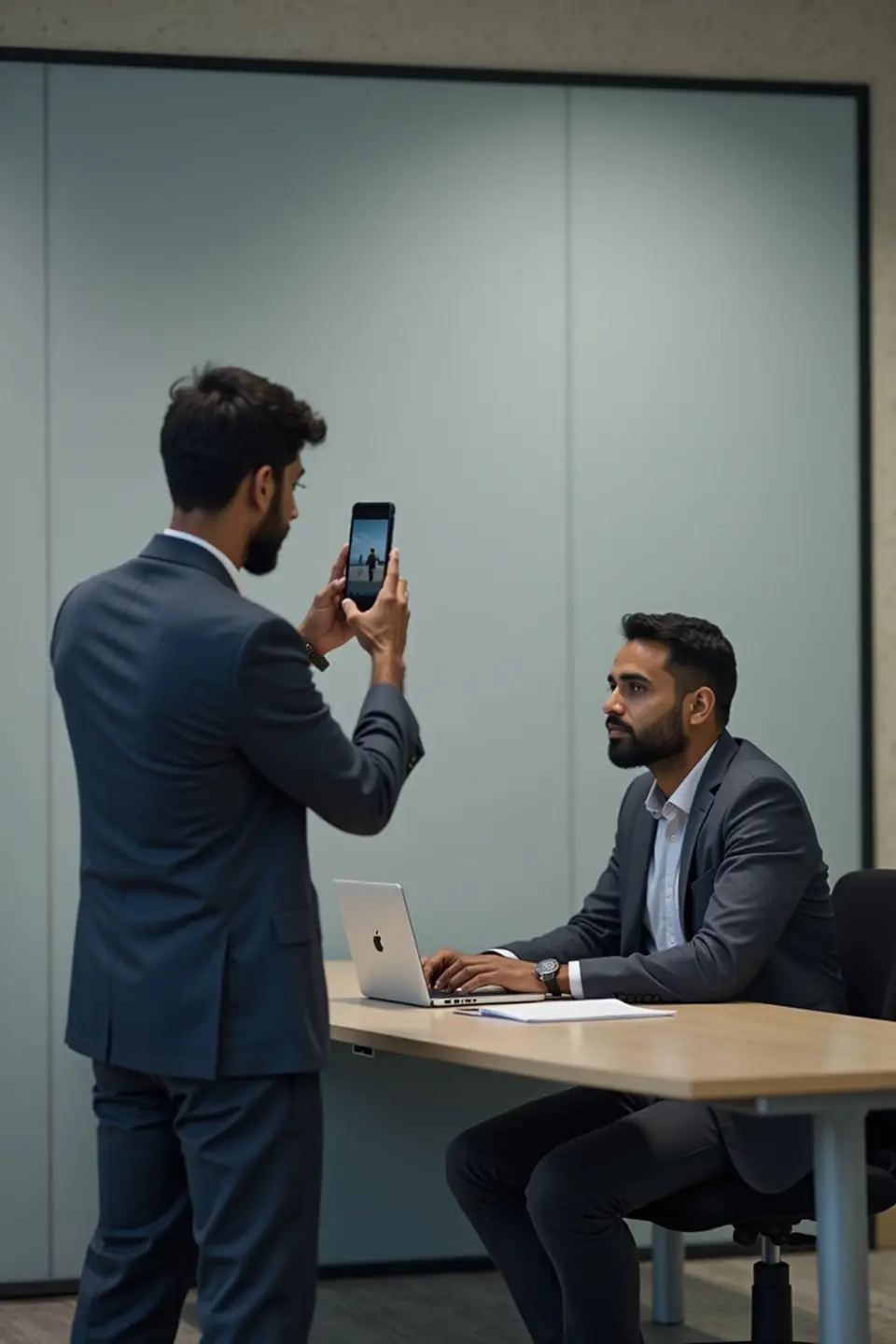
Assessment in progress
DPDPA compliant · Face-blurred on-device
Musculoskeletal risk is everywhere — and almost never measured at scale.
MSDs are the leading driver of workplace discomfort, presenteeism and disabling-injury cost — yet the assessment that catches them is slow, scarce, and rarely reaches every worker.
Too few ergonomists
Fewer than 5,000 certified ergonomists for 500M+ Indian workers — a manual, desk-by-desk assessment can never cover the whole workforce.
Point checks, not coverage
A 10-desk walkthrough extrapolated to thousands isn't defensible evidence when an auditor or insurer asks.
Cameras aren't always allowed
Security-sensitive floors ban cameras outright — so on a manual model the assessment never happens at all.
All the tools to evaluate workplace ergonomics
A worker assessment on any phone — camera or camera-free — and an aggregate risk dashboard for the employer, from one clinical engine.
A full framework library, more on the roadmap
Each assessment opens with the NMQ discomfort survey, then scores every ergonomic risk family — RULA, REBA, NIOSH, OWAS, LUBA, Liberty Mutual, MMC-ISO, RPA and more — plus validated surveys, the Modified LEST site-assessment instrument and the instant Desk Check, with EAWS and others on the roadmap.
On-device privacy
Faces are blurred on the device and full video is never uploaded.
Reports, two ways
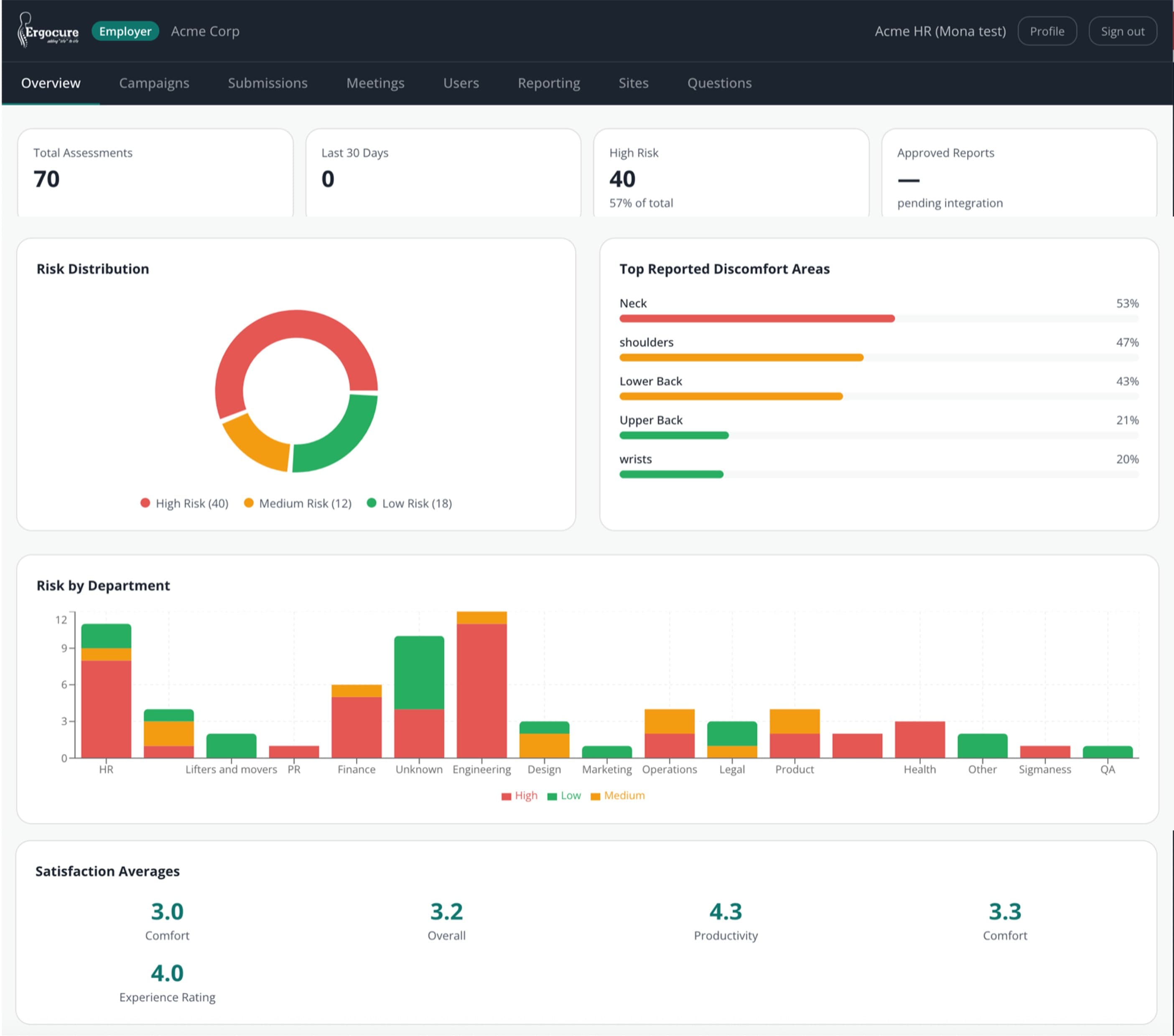
A personalised worker PDF and an aggregate employer risk dashboard.
One multi-method engine
Add a method and it inherits the whole pipeline — capture, scoring and report.
A full framework library, more on the roadmap
Each assessment opens with the NMQ discomfort survey, then scores every ergonomic risk family — RULA, REBA, NIOSH, OWAS, LUBA, Liberty Mutual, MMC-ISO, RPA and more — plus validated surveys, the Modified LEST site-assessment instrument and the instant Desk Check, with EAWS and others on the roadmap.
On-device privacy
Faces are blurred on the device and full video is never uploaded.
Reports, two ways
A personalised worker PDF and an aggregate employer risk dashboard.
One multi-method engine
Add a method and it inherits the whole pipeline — capture, scoring and report.
From phone to personalised report in 5 steps.
No hardware. No app install. No manual scheduling. A complete clinical assessment that fits in a browser tab.
Worker receives link or QR
No app install. Opens in any mobile browser. Works on any smartphone.
Captures front + side views
~2 minutes. Camera switches off after capture. Video never leaves the device.
AI scores posture on-device
33 body landmarks extracted. Joint angles computed geometrically. 10 frameworks scored — all on the device, before anything is sent.
Ergonomist reviews and validates
AI output goes to a certified ergonomist. They review scores, edit sub-scores, add clinical notes. Nothing ships un-reviewed.
Worker accesses OTP-gated report
8-digit code emailed. Personalised PDF with prioritised recommendations.
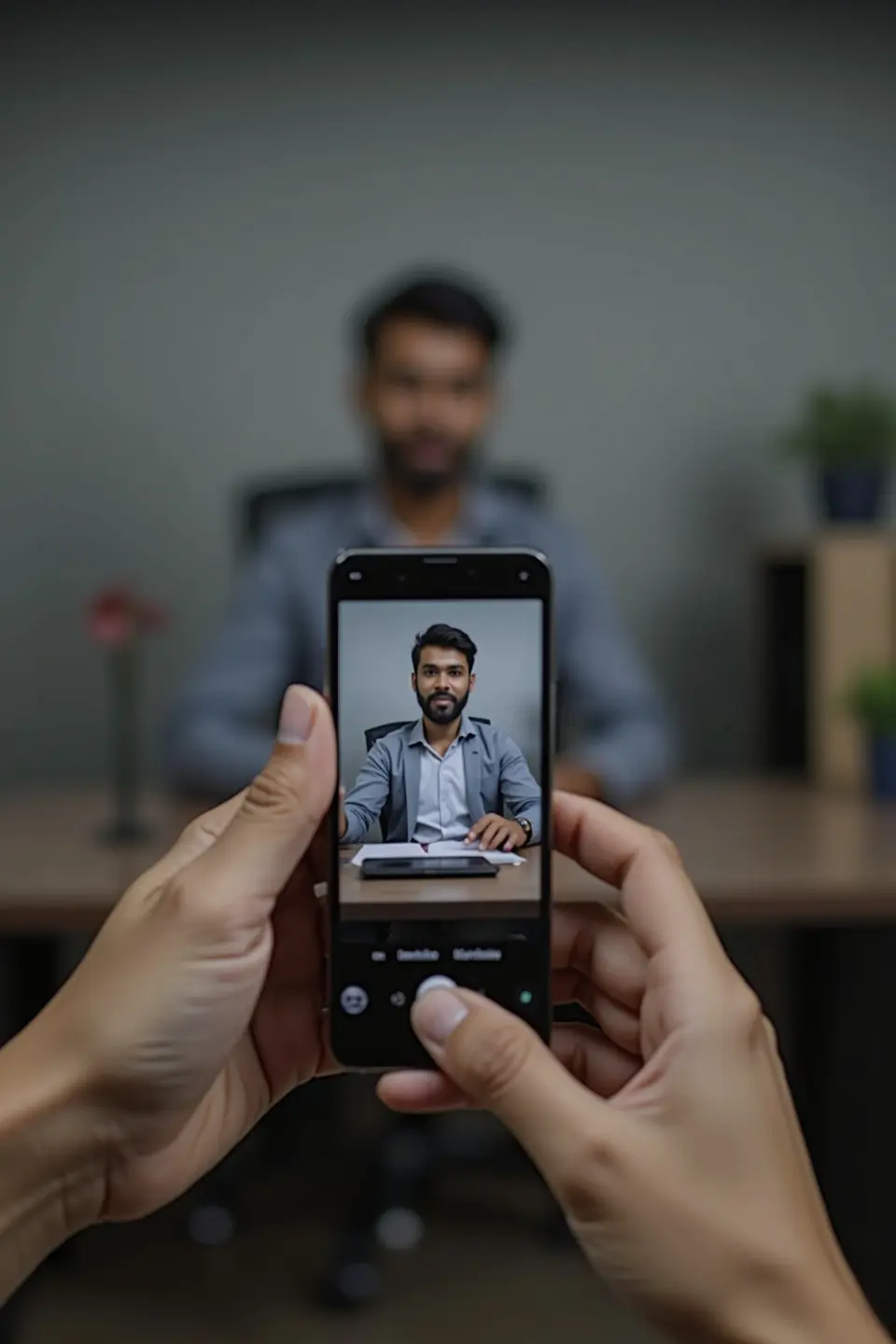
Step 2 — Worker captures workstation
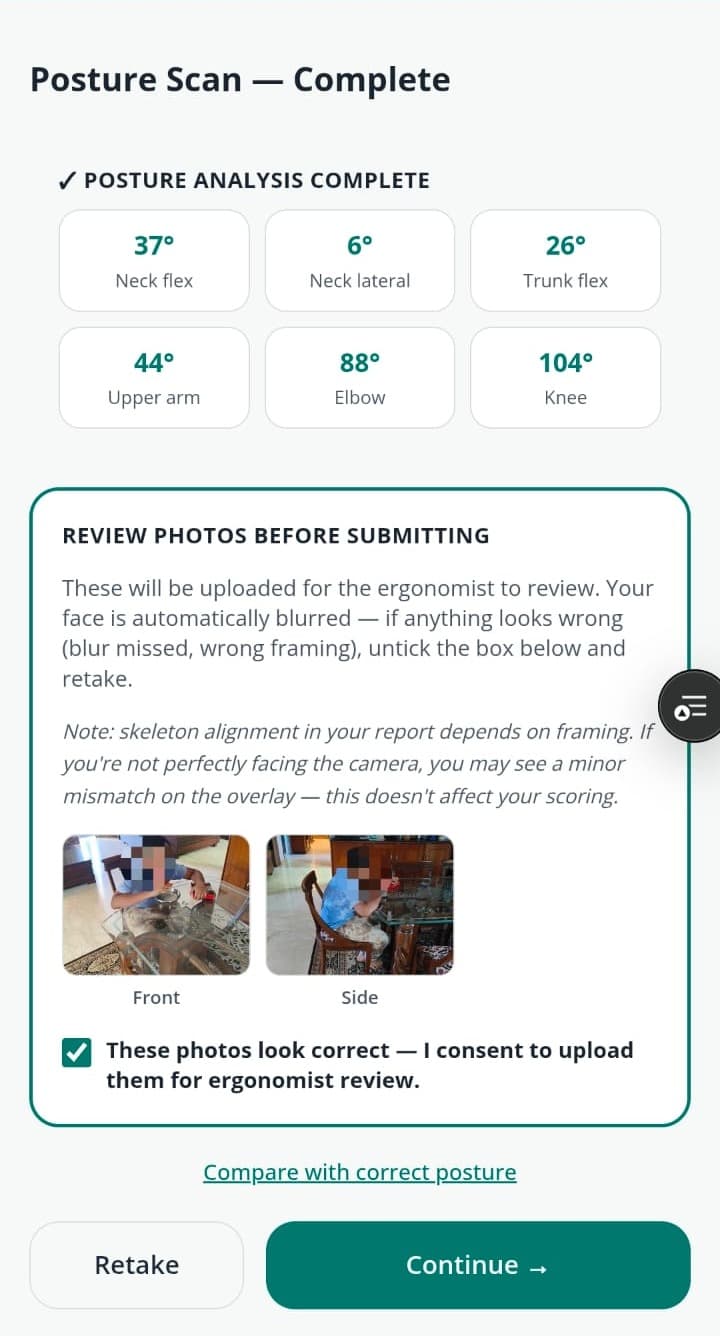
Step 3 — AI scores on-device. Real output.
What the AI actually measures.
Pure geometry from landmark coordinates — not self-report, not manual goniometer.
All angles computed client-side using dot-product + arccos on 2D pose-landmark coordinates. No server round-trip for scoring.
Joint angles computed by geometry from on-device landmarks · ergonomist-validated · face-blurred on-device.
Eleven frameworks. One engine.
Each method built from its primary-literature blueprint. No copy-paste.
Assess exposure to risk from whole-body postures, including lower extremities — particularly for tasks involving unpredictable, varied postures.
Assess exposure to risk due to posture, duration, frequency, and force for the upper limbs, neck, and trunk — particularly in sedentary, computer-intensive, or precision work.
Evaluate ergonomic risk at computer workstations — assessing chair, monitor, keyboard, mouse, and telephone configuration against validated office ergonomics standards.
Calculate the Recommended Weight Limit (RWL) for two-handed manual lifting tasks and determine the Lifting Index (LI) — the ratio of actual load to the RWL.
Quantify upper-limb exposure to repetitive, high-frequency manual work and predict the risk of work-related musculoskeletal disorders of the shoulder, elbow, wrist, and hand.
Assess the risk of distal upper extremity musculoskeletal disorders — specifically the wrist, hand, and forearm — in jobs involving repetitive or forceful exertions.
Analyse the distribution of working postures across an entire work cycle through time-sampling — identifying what proportion of time is spent in each posture category.
A posture-only joint-motion assessment focused on physical discomfort and localised stress accumulating in the trunk, neck, and upper limbs.
A comprehensive whole-body screening worksheet that evaluates working postures, action forces, manual material handling, and repetitive upper-limb load in a single instrument.
An international standardised compliance protocol establishing ergonomic limits and risk estimation for manual lifting, lowering, and carrying.
A psychophysical design reference for the safety of manual handling tasks — including pushing, pulling, and carrying alongside lifting and lowering.
A physics-based modelling approach that calculates internal mechanical stresses — compression and shear forces — acting on muscles, joints, and spinal discs during work.
A whole-job workplace-conditions evaluation that scores five orthogonal dimensions on a common 0–10 scale and plots them as a histogram — so a physically light but psychologically punishing job, and its reverse, are both visible.
A practical, action-oriented workplace screening checklist designed to identify high-impact improvements across a wide range of operational conditions.
A thermal-comfort model that evaluates and predicts how large groups of people experience the climate of an indoor space.
A fast whole-body posture triage that captures the dominant working posture and how long it is held, pointing to where a fuller method (RULA, REBA, OWAS) is warranted.
A subjective workload index that measures how demanding a task feels across six dimensions — complementing the physical methods for mentally demanding work.
A psychosocial and work-organization screen — job demands, control, support and recovery — that captures organizational risk the physical methods cannot see.
A validated screen for computer vision syndrome — the cluster of ocular and visual symptoms that arise from sustained screen work.
Methods marked Soon are on our roadmap — each new method costs ~20–30% of the first on the shared engine.
Six ways to deploy — for every workforce context.
From a 5-minute phone capture to a structured text questionnaire. Configure per campaign.
Worker films their workstation on any phone.
On-device AI scores posture from video. Fastest time-to-report.
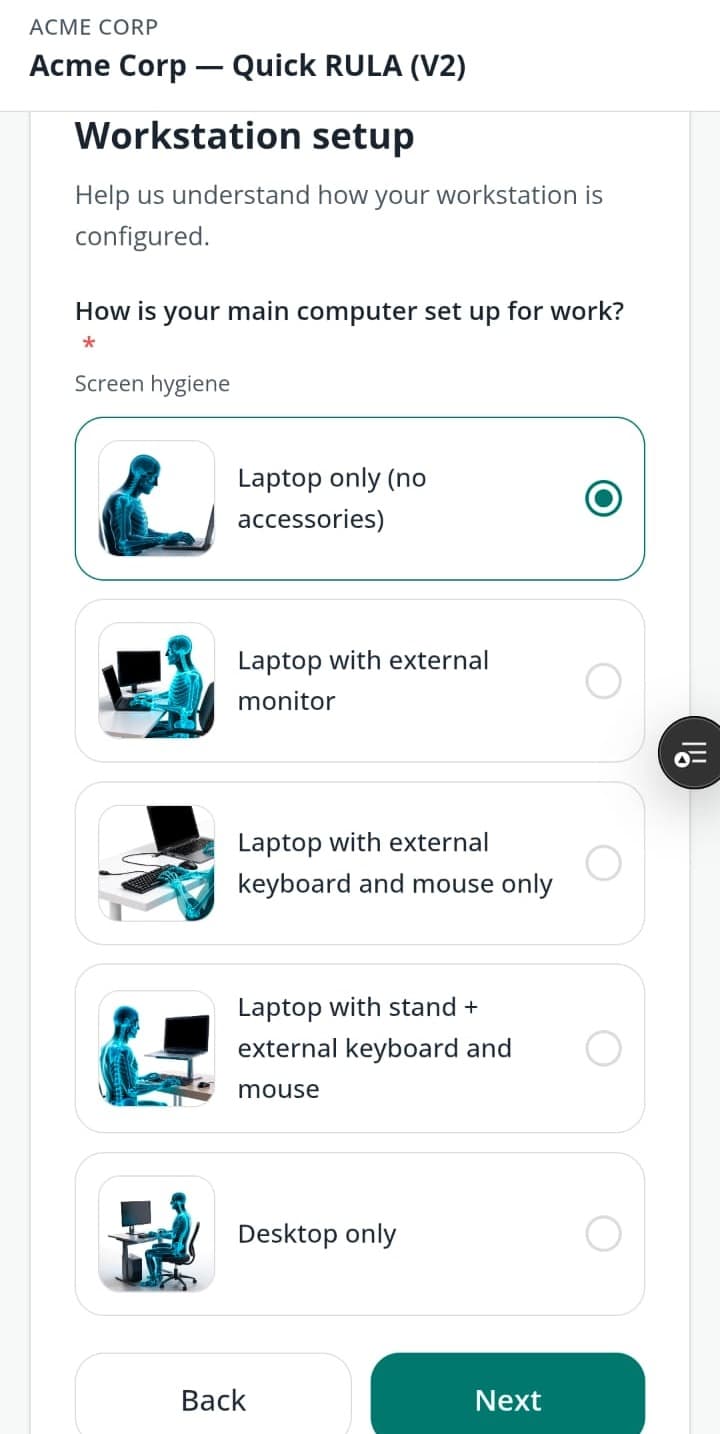
Structured digital questionnaire with illustrated questions.
No camera required. Scored against the same clinical frameworks, every result ergonomist-validated — built for sites where cameras aren't allowed.
Worker enters a few details — instant desk-setup report.
Ideal seated and standing heights plus the fixes worth making, computed on the spot. Instant and fully automated — no ergonomist wait.
Combines video capture with guided questionnaire.
Richer data for complex tasks. Best signal-to-noise for ergonomist review.
Runs multiple methods in one campaign.
A single worker completes one assessment that generates RULA + ROSA + NIOSH scores simultaneously.
Methodless questionnaire campaign — no camera, no score.
Symptom screens and custom questions for workforce-health data collection and research. Exports to CSV; no clinical report.
What we run — and what it takes from you
A clear division of responsibility. You bring the access; we bring the engine, the methods and the clinical sign-off.
What you bring
- A worker roster and the sites, floors or seats in scope.
- A coordinator to share the assessment link — workers self-capture in ~5 minutes, no downtime or app install.
- Your camera and data-privacy policy — you set the capture mode (camera or camera-free) and privacy controls.
What we bring
- The clinical engine and on-device capture — AI posture scoring across 11 validated frameworks plus surveys.
- A certified ergonomist who reviews and signs off every result before any worker sees it.
- Audit-ready reports plus an aggregate risk dashboard — the documented evidence your mandate needs.
AI computes. The ergonomist signs off. Every time.
What they see
- AI scores per method
- Joint angles & confidence
- Pose photos (face-blurred)
- Pain diagram (NMQ)
What they edit
- Sub-scores per body segment
- Recommendations & priority
- Clinical notes
- Risk narrative
Approval gate
Approve is blocked until all methods are validated. Every score is signed off before the worker sees it.
“The clinical methodology, framework selection, and recommendation logic the platform encodes are the work of our certified ergonomists — not a software team’s interpretation.”
Privacy by design — three mandatory layers.
Face blur is permanent. Body blur is configurable. Render opacity is configurable. None can be removed by the employer.
Layer 1 — Face blur
An elliptical pixel block is drawn over the detected nose landmark on every captured frame. Cannot be disabled. Applied before any data leaves the device.
Layer 2 — Body blur
0–100% whole-canvas pixelation per campaign. Configured by your Super Admin. Campaigns can only tighten — never loosen — the company default.
Layer 3 — Render opacity
How faintly the photo shows behind the skeleton wireframe in the report. 0% = skeleton-only. 38% = default overlay. SA-controlled per campaign.
Compliance
Captured on any phone · processed on-device · the source video never leaves the worker's device.
Built for enterprise deployment from day one.
Security, compliance, and clinical rigour aren't features — they're the foundation.
Multi-tenant
Employer sees aggregates only. Clinical data is SA + Ergonomist exclusively — enforced at the database row-level.
No app install
A link or QR code. Any smartphone browser. No MDM, no app store, no IT provisioning.
SSO ready
OAuth2/OIDC on the roadmap → SAML for enterprise SSO. No blocker for enterprise deployment.
BRSR-mappable
Every assessment generates OHS data that maps directly to SEBI BRSR reporting requirements for listed companies.
Full audit trail
Every ergonomist action is logged with timestamp, identity, and change record. Legally defensible, ISO 45001 aligned.
IT requirements
No firewall changes for employees. Data stays in Mumbai region. Read the full IT spec before onboarding.
Employees would do it again
Anonymised, verbatim feedback from a recent enterprise engagement.
I would highly recommend her to everyone.
Incredibly knowledgeable — I would highly recommend her to my colleagues.
Very knowledgeable and helpful in demonstrating techniques. A great session.
Ready to see it with your team?
Request a Pilot — 20–50 assessments, clinically validated reports, employee feedback before you roll out.